
Link Your Facebook Shop to Your Group and Boost Sales Today
Link Your Facebook Shop to Your Group and Boost Sales Today
I hope your week has been awesome so far! Have you learned this cool trick yet? I can count on one hand how many times I’ve said, “Thank you, Facebook!” 🤣 and this is one of those moments.
😍Shop owners can link their shops with their official Facebook Groups! Woohoo! If you have a Shop on Facebook AND a group you’ve created for your fans, you can link the two and show off your products to your members – nice! I don’t know about you, but I’d been waiting years for them to do this…literally.
So if you haven't done it yet, here’s what you need to do to stop leaving money on the table:
On a desk/laptop computer, go to your Facebook fan group. Over on the left sidebar you’ll see some admin tools. Poke around in there until you find the option to link your shop to your group. Then follow the prompts from there.
Your interface is likely different from mine, so that’s why I say to ‘Poke Around’ until you find it. Below is a screenshot of what it will look like when you're finished.
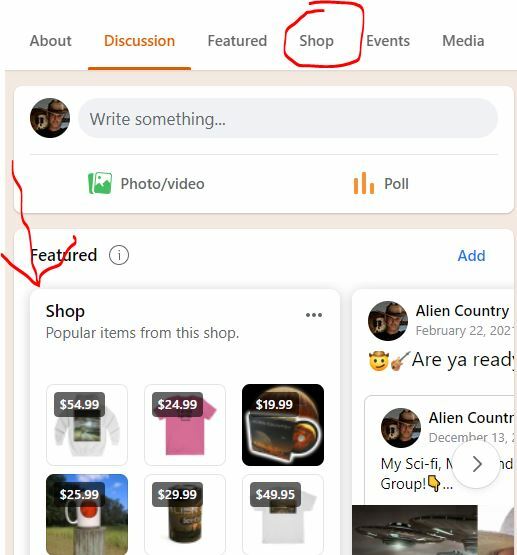
Remember, this only works if your official Facebook page has a Facebook Shop associated with it. Either a native shop there on FB or one that’s linked to your Shopify.
Even though this feature is exciting, most people get stuck trying to find the right settings. Facebook’s interface changes often, and what seems simple can still waste hours if you’re not confident navigating the backend. Instead of guessing your way through it, why not let me walk you through it the right way? In just one Success Session, I’ll help you link things up and make sure your products are getting seen by the people who are most likely to buy. Email me to grab some Success Sessions now!
PS: On a side note, some shops have a big, underlying problem: your platform stinks! I was never fully happy with platforms like Drip, Wordpress and Shopify so I decided to build my own - the platform of my dreams🤩 Now I’m offering it to people who also feel the pain of paying WAY too much for essential tools that don’t stink. Let me know if you want details.
